
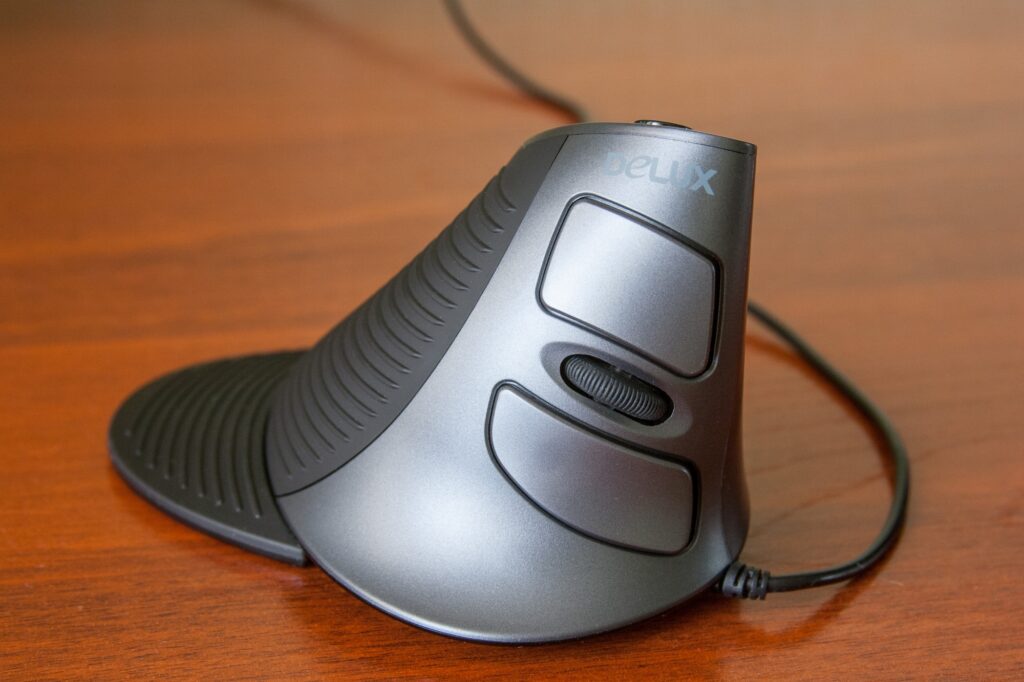
Vertical Mouse UK 2026: Why Home Workers Are Quietly Switching to Save Their Wrists
In 2026, the vertical mouse is having a moment in the UK. Five years ago it was a niche curiosity ordered from German ergonomics catalogues by office workers who already had wrist problems. Today, NHS occupational therapists recommend it, John Lewis stocks it without anyone having to explain it, and remote workers across the country are quietly swapping their flat mouse for one that stands on its side – usually after a year or two of typing through a dull ache they can no longer ignore. If you have started searching the term “vertical mouse UK” and feeling slightly daft about it, you are in much larger company than you think.
In This Article
This is not a trend piece. It is a sober look at why the shape of a thing you click forty thousand times a day might matter more than any other home office upgrade you make this year, and what to actually do about it.
What a vertical mouse actually is
The clue is in the name. A standard mouse asks your forearm to rotate inward – the technical term is pronation – so your palm faces the desk. Hold that posture for eight hours, day after day, and you compress the soft tissue between your radius and ulna, the two bones in your forearm. A vertical mouse rotates the device by anywhere from forty-five to ninety degrees, putting your hand into a relaxed handshake position with the thumb pointing up.
That single change reduces pronation, eases pressure on the median nerve, and removes the constant low-grade tension most office workers carry without noticing. The buttons are still under your fingertips. The cursor still moves left to right. The only thing that changes is the angle – and, for a lot of people, the way their wrist feels at six in the evening.
Why so many UK home workers are switching now
Three things have collided in 2026.
First, hybrid working stuck. A meaningful chunk of the UK workforce is now using laptops on dining tables and second-hand kitchen chairs for at least part of the week. Domestic setups are, on average, worse ergonomically than the offices we left in 2020. Pain has had time to catch up.
Second, the kit got cheaper and better. Logitech’s Lift, released in 2021, brought a credible vertical mouse to the mainstream. By 2026 you can buy a competent wireless model from Anker, Trust or Kensington for under £50, and a serious one from Logitech or Evoluent for under £100. The fringe-curiosity tax has gone.
Third, GPs and physiotherapists are seeing the consequences. The Health and Safety Executive’s guidance on display screen equipment has been quietly pointing employers toward proper input devices for hybrid staff, and the medical profession is asking patients more pointed questions about how they spend their working days. People are being told to do something. A vertical mouse is the something they can do this afternoon.
How to tell if your wrist is heading for trouble
Most people who buy a vertical mouse do not have full-blown carpal tunnel syndrome. They have the warning signs, and they have ignored them for two years.
The early flags are familiar once you know what to look for. A dull ache on the underside of your forearm by the end of the working day. Numbness in the thumb, index or middle finger – the three fingers served by the median nerve. A tingling sensation that wakes you up at night and goes away when you shake your hand out. Stiffness in the morning that takes ten minutes of typing to loosen. Difficulty gripping a coffee cup with your mousing hand on a heavy day.
If any of that sounds familiar, do not start with the mouse. Start with a GP appointment, particularly if the symptoms are persistent or have lasted more than a few weeks. The NHS guidance on repetitive strain injury is a useful first read. A vertical mouse is preventive kit and gentle rehabilitation kit. It is not a replacement for medical advice, and the symptoms above can also indicate problems that have nothing to do with how you click.
That said: most people who get checked are told the same thing. Sort the workstation. The mouse is part of the workstation. It is also the cheapest and most immediate part of it to change.
What to look for in a vertical mouse for the UK home office
Not all vertical mice are equal. There is a real spectrum of quality, and a few specifications matter more than the marketing suggests.
The angle. Pure ergonomic logic favours a ninety-degree handshake position, but most people find around sixty degrees more comfortable for everyday work. If you are switching from a flat mouse, a sixty-degree model will feel less alien and you will adjust faster. The Logitech Lift sits at fifty-seven degrees and is a sensible starting point.
The size. This is where most people go wrong. Vertical mice are sized like cycling shoes – small, medium and large are not interchangeable, and a mouse that is too big for your hand will force the very pronation it was meant to fix. As a rough guide: under 17cm hand length means you want a small or compact model; 17 to 19cm means standard; over 19cm means full-size. Logitech, Anker and Evoluent all publish sizing tables. Use them.
Wireless connection. Bluetooth is now reliable enough that a dedicated USB dongle is no longer a meaningful upgrade. Look for a model that pairs with multiple devices and lets you switch between your work laptop and personal machine with a single button press, particularly if you are juggling a hybrid setup like the one in our home office chair UK guide.
Battery and charging. Rechargeable USB-C is now standard on the better models. Avoid anything still running on AA batteries unless you enjoy buying batteries.
A scroll wheel that does not click rattle. Sounds petty. It is not. You will scroll thousands of times a day. A cheap mouse will start to clatter within a year. Test in store or buy from somewhere with a good returns policy.
The adjustment period nobody warns you about
This is the bit that catches everyone out. For the first three days, your new vertical mouse will feel like trying to write with the wrong hand. Your accuracy will drop. You will hit the wrong button. You will feel slightly stupid in calls.
This is normal and it does not last. Most people are back to baseline accuracy by day five and feeling actively better by week two. The neural pathway from your brain to your fingertips is rewriting itself, and that takes a few thousand clicks to settle.
The mistake people make is keeping their old mouse on the desk during the transition. The temptation to switch back during a deadline is too strong. Put it in a drawer. Commit for two weeks. If by week three you are still uncomfortable, the size is probably wrong, not the concept.
A few practical notes. Cursor speed almost always needs to come down for the first week – your finer motor control is recalibrating, and a fast pointer makes that harder. Mac users will find that scrolling direction sometimes inverts on the new device; you can fix it in System Settings. And if you also use a monitor arm to free up desk space, reposition the screen first – vertical mouse comfort depends partly on where your eyes are looking, because that determines where your shoulders sit.
The honest verdict on cost and benefit
A decent vertical mouse will set you back somewhere between forty and a hundred pounds. That sits in the same bracket as a quality office chair cushion or a year of paracetamol and ibuprofen for chronic wrist pain. As an investment in remaining able to do your job comfortably for the next decade, it is small money.
It is not a magic solution. The single biggest predictor of whether home workers feel better after switching is whether they also fix their seating, screen height and break habits at the same time. A vertical mouse paired with a slumped sofa setup will not save you. Pair it instead with an ergonomic keyboard if both wrists tend to flare, and the gains compound rather than competing. A vertical mouse paired with a chair at the right height, a screen at eye level, and a five-minute break every hour will, for a lot of people, take a problem they had been quietly worrying about and make it gradually disappear.
For the price of one bad takeaway a month, that is hard to argue with – assuming you take the rest of the setup seriously, which you can read more about in our coverage of the best video call gear for UK home workers in 2026. The kit is now affordable. The case for it is now mainstream. The only thing left is the decision.
So here is the question. If you have been pushing through a low-level wrist ache for the last six months, telling yourself it will sort itself out – what exactly are you waiting for?





Got mine on a whim about 4 months ago after months of physio for what turned out to be straightforward mouse-arm. The transition is awful for the first week, won’t lie – my pointer accuracy was tragic – but past that I genuinely don’t notice it any more. The trick I’d add: get the wireless one, the cable on the cheaper Logitech version drags on the desk in a really annoying way. Has anyone here tried a vertical and a trackball combo, or is that overkill?
Echo the wireless point – the cable on mine sticks out at exactly the wrong angle and I keep catching it on the keyboard tray. Took me about 10 days to stop feeling like I was learning to write left-handed but now I can’t go back. Did your physio mention anything about wrist position with the new mouse?
Switched to a Logitech MX Vertical about 18 months ago after weeks of wrist niggles and honestly didn’t expect it to make the difference it did. Took maybe three days to stop fumbling clicks. The gesture button is more useful than it looks once you set it up properly. Is the smaller Lift any good for people with smaller hands?